
Article 1: Mastering JVM Performance Tuning and Garbage Collection in Java 17, 21, and 25
Introduction
Performance tuning is one of the most important responsibilities of Java engineers maintaining enterprise applications. As systems scale to thousands of concurrent users, applications may experience increased response times, excessive CPU usage, memory pressure, or unexpected garbage collection pauses.
Modern Java provides sophisticated garbage collectors, diagnostic tools, and runtime configuration options that can help engineers investigate these problems.
The key principle is simple: JVM tuning should begin with measurement, not assumptions.
Understanding JVM memory architecture
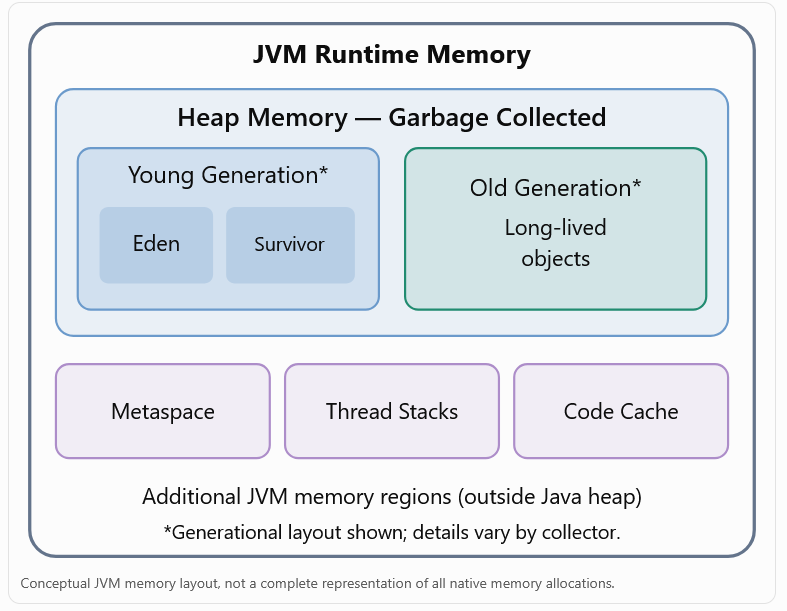
The Java heap stores most application objects and is managed by the garbage collector. Metaspace holds class metadata, while thread stacks and other native allocations also contribute to process memory consumption.
An application can therefore use substantially more resident memory than the configured maximum heap size.
Comparing garbage collectors
| Garbage collector | Characteristics | Typical use |
|---|---|---|
| G1 GC | Balanced throughput and predictable pause goals | General enterprise applications |
| ZGC | Low-latency garbage collection | Latency-sensitive services |
| Parallel GC | Throughput-oriented collection | Batch processing |
| Serial GC | Simpler, low-overhead collector | Small applications |
G1 is a common default for server-class JVM environments. ZGC is particularly relevant when reducing latency caused by collection pauses is a priority. Java 25 supports generational ZGC; collector availability and defaults differ across JDK versions.
Practical example: Simulating allocation pressure
The following Java program allocates temporary objects and retains a bounded set of objects to demonstrate garbage collection behavior.
import java.util.ArrayList;
import java.util.List;

public class GcPressureDemo {
    public static void main(String[] args)
            throws InterruptedException {

        List<byte[]> retained = new ArrayList<>();

        for (int i = 0; i < 10_000; i++) {
            byte[] data = new byte[64 * 1024];

            if (i % 20 == 0) {
                retained.add(data);
            }

            if (retained.size() > 100) {
                retained.remove(0);
            }

            if (i % 1_000 == 0) {
                System.out.println(
                    "Completed allocations: " + i);
                Thread.sleep(10);
            }
        }
    }
}
Compile it:
javac GcPressureDemo.java
Run with G1 GC:
java -Xms128m -Xmx256m \
  -XX:+UseG1GC \
  -Xlog:gc*:file=gc-g1.log:time,uptime,level,tags \
  GcPressureDemo
Then compare ZGC:
java -Xms128m -Xmx256m \
  -XX:+UseZGC \
  -Xlog:gc*:file=gc-zgc.log:time,uptime,level,tags \
  GcPressureDemo
These commands are intended for experimentation on JDK 21 or 25; specific ZGC options vary by release.
What should we measure?
Measure throughput, allocation rate, maximum and percentile GC pause duration, heap occupancy, and CPU utilization.
The experiment above demonstrates GC activity but is not a representative benchmark for production workloads. Compare collectors under consistent workloads, adequate warm-up, and identical resource limits.
Diagnosing an actual JVM
JDK diagnostic commands include:
# Locate running Java applications
jcmd -l

# Inspect the heap
jcmd <PID> GC.heap_info

# View command-line flags
jcmd <PID> VM.flags

# Start a 60-second Flight Recorder capture
jcmd <PID> JFR.start duration=60s \
  filename=performance.jfr settings=profile
Java Flight Recorder can help engineers identify allocation hotspots, CPU-intensive methods, contention, and other performance bottlenecks.Production tuning recommendations
Establish a baseline using response-time percentiles (p50, p95, p99), throughput, CPU usage, and memory consumption.Start with the collector selected by the JVM before introducing custom tuning.Investigate application-level excessive allocations and memory retention.Evaluate GC logs and Java Flight Recorder captures together.Test tuning changes under realistic load and compare against the baseline.Leave sufficient container memory for non-heap and native allocations.